





















We have added two brand-new Audio Tools features, both available immediately 😇
Spectrum Viewer
This tool visually displays audio frequency distribution and energy changes as a spectrogram, and supports uploading multiple files at once.
The horizontal axis is time, the vertical axis is frequency (low at the bottom, high at the top), and brighter colors mean stronger energy. Use it to quickly assess whether audio has undergone lossy compression by looking for cut-off high frequencies, explore a song’s arrangement, and more.
Hover over the spectrogram to see the frequency at that position, click to jump to that time for playback, and use the mouse wheel to zoom.
Auto Mute
This tool automatically detects silent or quiet sections in audio and silences them.
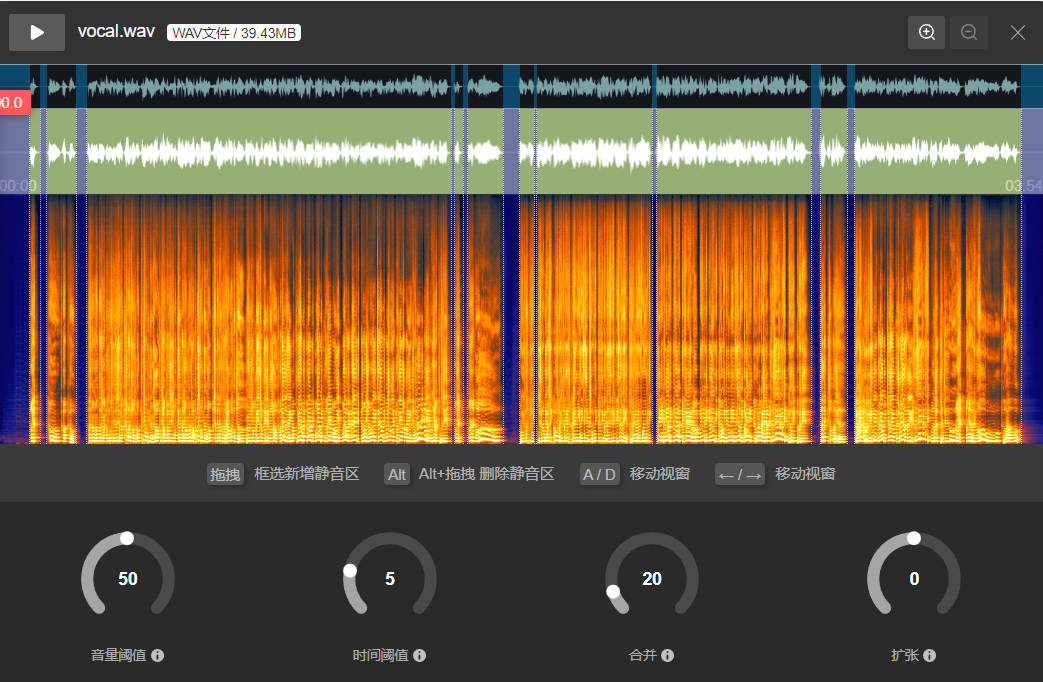
Some users recently shared workflows for processing vocals and training models. We noticed that most still use old-fashioned manual methods: preprocessing often involves cutting quiet but still audible unwanted sounds and background noise from vocals by hand in RX or AU, since keeping these sounds can affect training. We launched this tool to silence audio quickly. It repackages a mature tool already used in Dango’s own workflow for everyone to use 😇
It is especially suited to post-processing recordings, such as removing faint background noise and other unwanted sounds from recorded vocals with one click.
Adjust the controls below to change how detection works:
- Volume Threshold: the volume level used to identify silence. Lower values are more sensitive and more readily identify quiet sections as silence;
- Time Threshold: the minimum duration needed to trigger silencing. Lower values detect shorter pauses too;
- Merge: combine nearby silent intervals into one. Higher values widen the merge range and produce more continuous silent sections;
- Expand: expand interval boundaries outward or contract them inward, leaving a more generous or more precise range.
Tool Categories Reorganized
As our tool collection grows, we have split lightweight tools from one category into two: analysis tools generally analyze audio without producing output, while editing tools produce new tools 😇
Spectrum Viewer Upgrade
Tools that need spectrogram viewing, such as Lossy Analyzer, now have improved spectrogram capabilities. Zoom in to inspect more event details. We also optimized performance extensively, so dragging and zooming load instantly, just like local spectrogram software 😇


